General POS
General POS
Tea and rice packages at a barcode scanner in a 3D General POS checkout scene
New Owner app for Android phones

POS for supermarkets and shops in Kenya

Manage checkout and supplier deliveries across your branches. Set prices and staff permissions from the desktop, take M-Pesa at the till, and check sales or receive stock from your phone.

From KES 15,000, paid once. We set it up, back it up and keep it updated, and the first year is included.

Keeps selling when the internet goes off

Cash sales are saved on the till and sent once you are back online.

M-Pesa confirmed at the till

The customer pays from the prompt on their phone and the till marks the sale paid, so cashiers do not have to check messages.

Cash that adds up

At the end of every shift the cashier counts the drawer and the till records any shortage.

KRA eTIMS

Send your sales to KRA from the same system you sell with.

Features

What you get at the till and in the back office

Run checkout on every till

Scan packaged goods or compatible scale labels containing weight or price. Hold a cart while the customer finishes shopping, then take cash or confirm M-Pesa at the till. Record card payments with the terminal reference.

  • Configurable scale barcode layouts
  • Automatic offers at checkout
  • Shelf labels and customer receipts
General POS
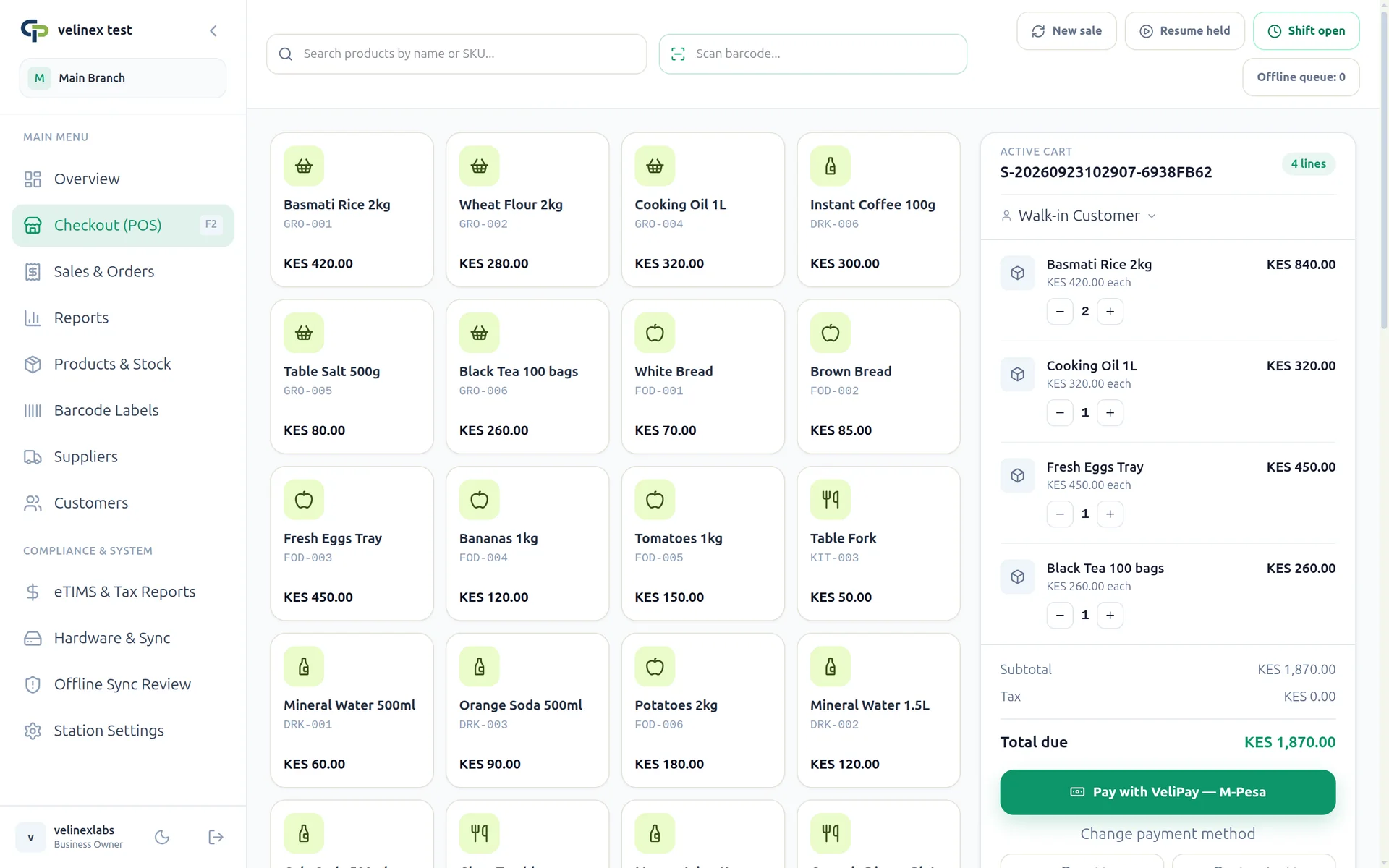
Checkout screen with scanned items in the cart and the total ready for cash or M-Pesa

Manage stock from delivery to sale

Create supplier purchase orders and record what arrives, including partial deliveries, batches and expiry dates. Sales reduce stock at the branch. Staff can receive orders from the Android app while checking a delivery.

  • Purchase orders and goods receipts
  • Stock counts and branch transfers
  • Low-stock warnings
General POS
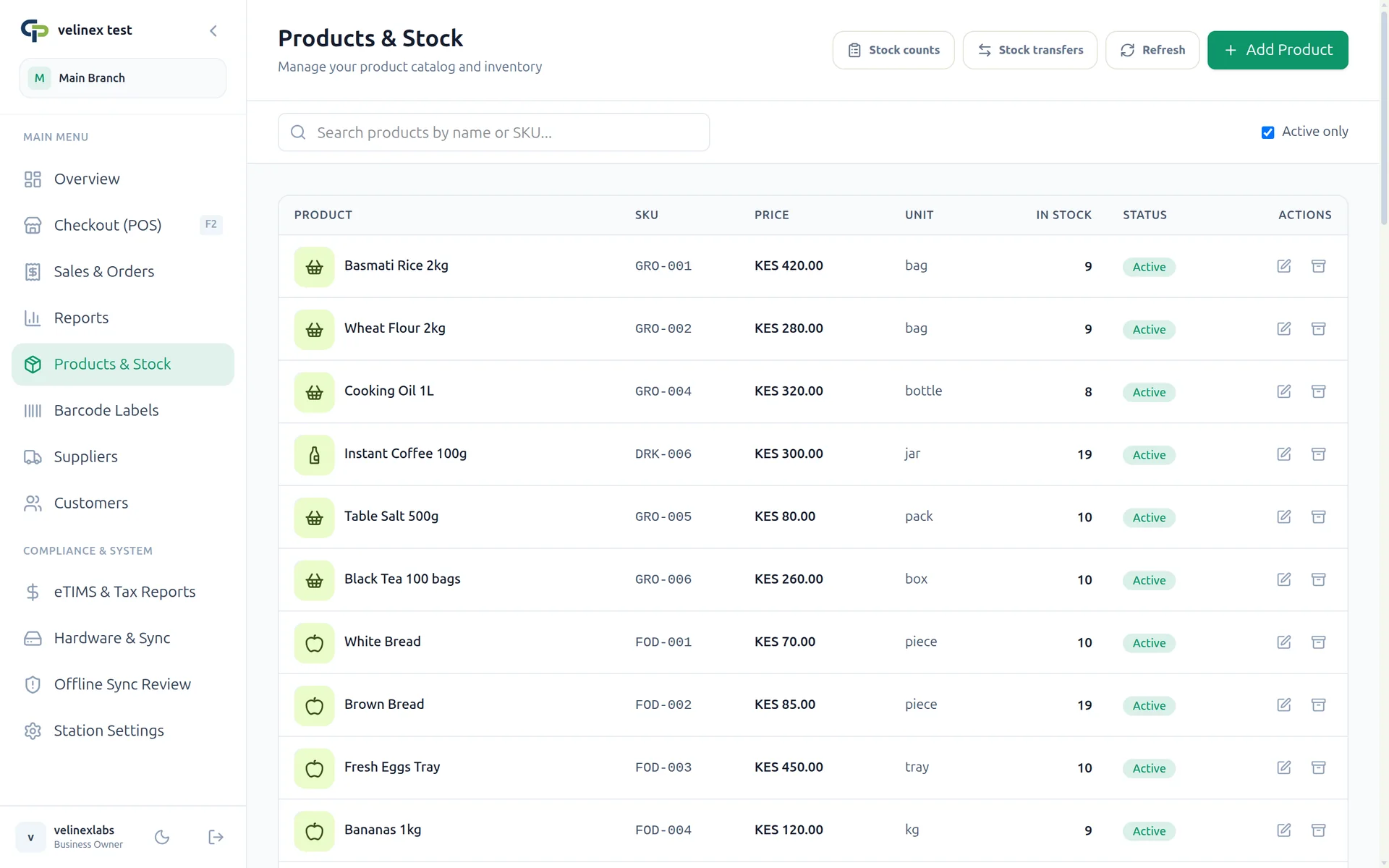
Products and stock list showing each item's price, unit and quantity in stock

Compare performance across branches

Review sales by cashier, best-selling products and reported profit for a chosen period. Head office can compare branches, set branch prices and export records for the accountant.

  • Branch comparisons and sales reports
  • CSV product and price imports
  • API exports for other business systems
General POS
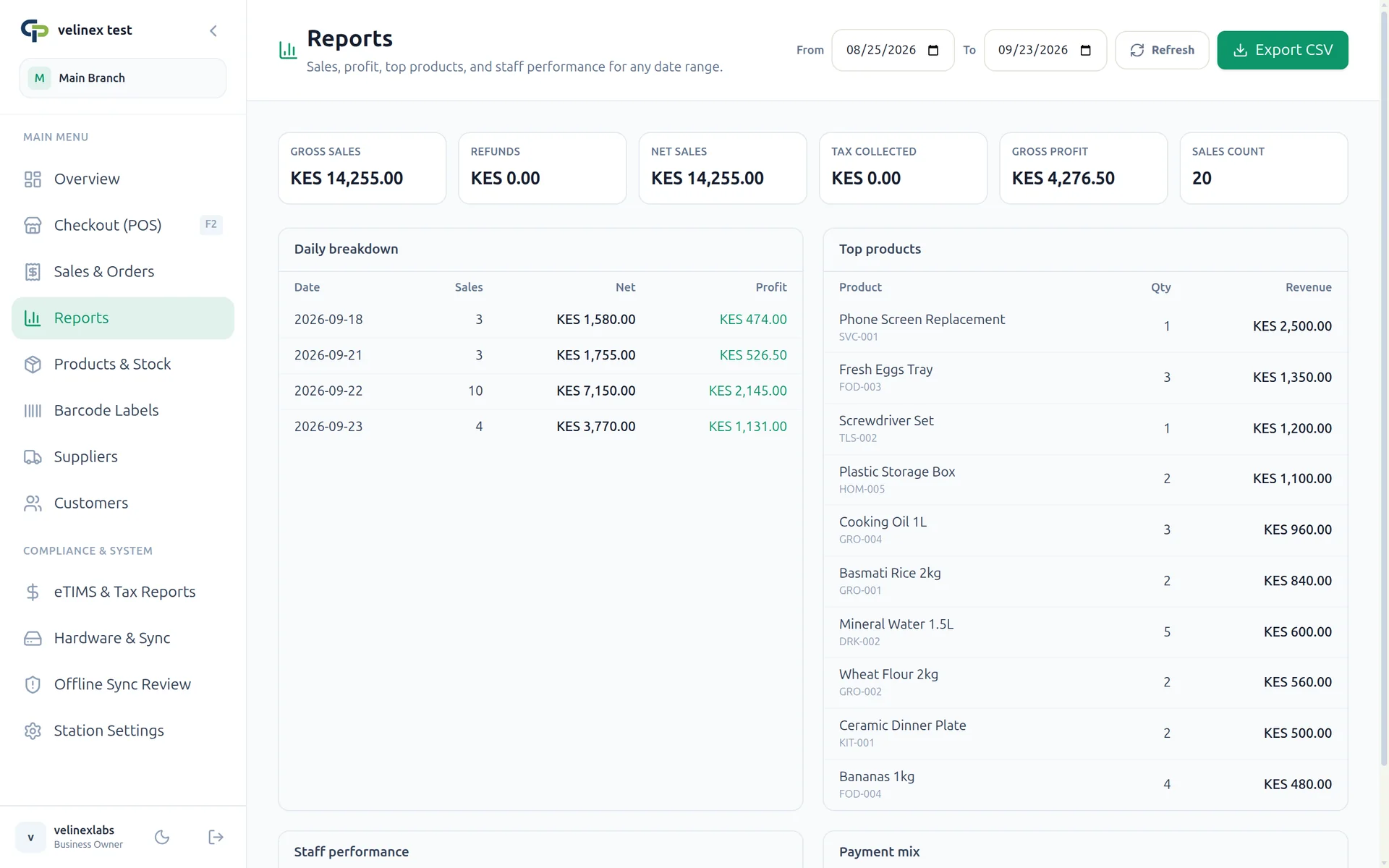
Sales report with gross sales, profit per day and top-selling products

Give staff the access their role needs

Each member of staff has a separate account. Set their permissions and branch access, and review who recorded a discount, void or refund. Keep customer loyalty points and credit collections in the same system.

  • Cashier and manager permissions
  • Shift opening and cash reconciliation
  • Loyalty accounts and credit collections
General POS
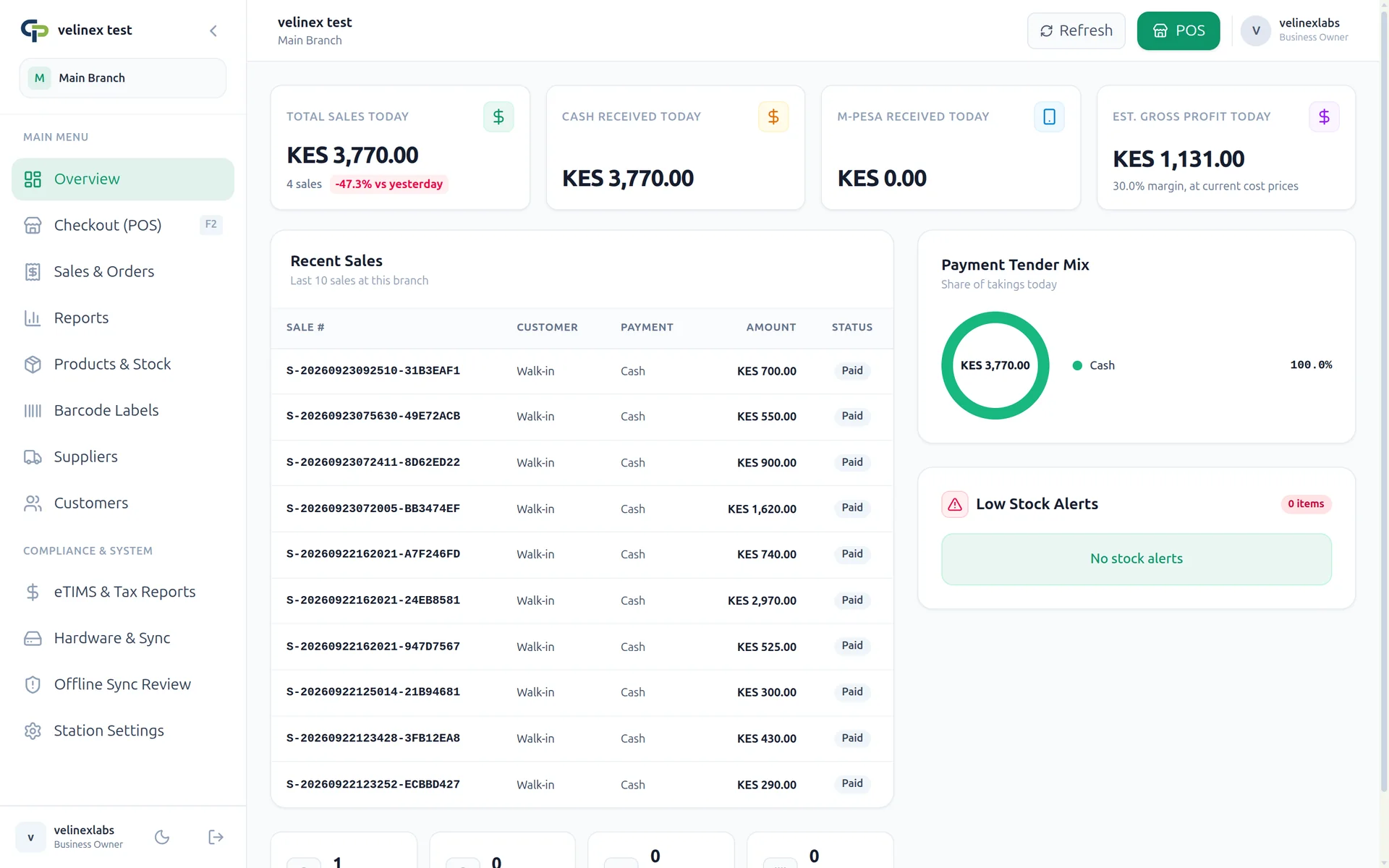
Shop overview with today's sales, cash and M-Pesa received, and recent sales

Comes set up for your type of business

  • Supermarkets
  • Hardware shops
  • Pharmacies
  • Bars and lounges
  • Restaurants and cafes
  • Liquor stores
  • Bakeries
  • Clothing and shoes
  • Electronics shops
  • Wholesalers
  • Hotels
  • Gyms
  • and more
We run it for you

You sell. We look after the system

You do not need an IT person or your own server. Your first payment covers the setup and a year of running it for you.

Set up by us

Pay by M-Pesa and your system is ready a few minutes later. Then add your products and staff and open the till.

Backed up every day

Your sales and stock are backed up daily, so a broken computer does not take your records with it.

Updates without the work

New versions and fixes are free. The app tells you when one is out and updates itself.

Your data and hosting choice

Your business owns its data. Supermarkets and other large shops can host General POS on their own servers at an agreed price, with software development and update delivery from Velinex Labs. Contact us to discuss the setup.

Owner app

Check on the shop from your phone

Review today's sales and branch stock from the General POS Android app. Sell and share receipts, receive deliveries against purchase orders, and manage staff access with the permissions assigned to your account.

  • Today's sales, as they happen
  • Stock in each branch
  • Sell and share receipts
  • Add staff and set their access
Coming soon toGoogle Play Included with every plan
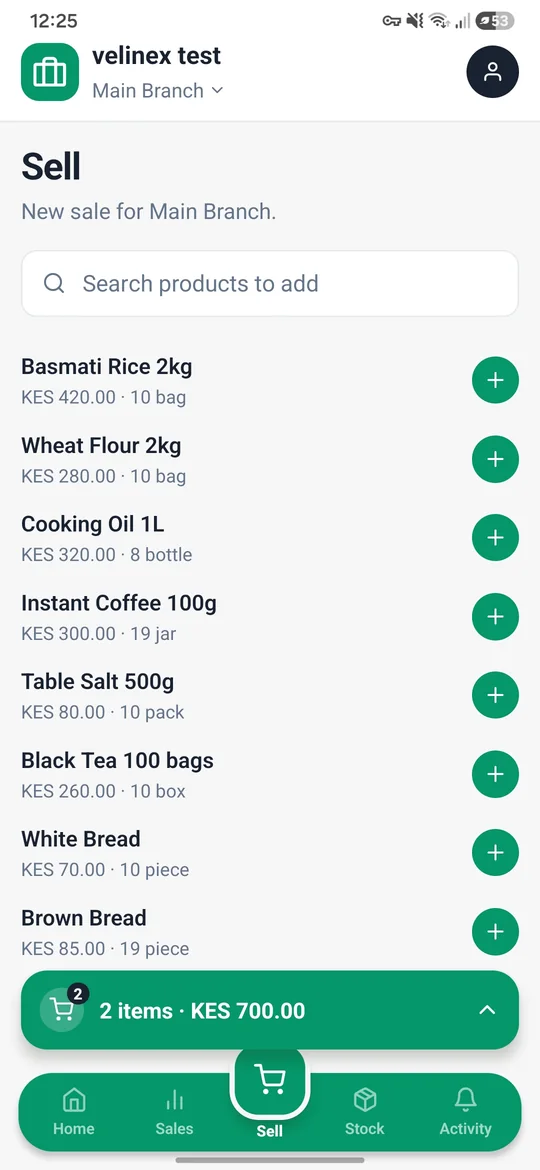
Owner app Sell screen with products and a cart of 2 items
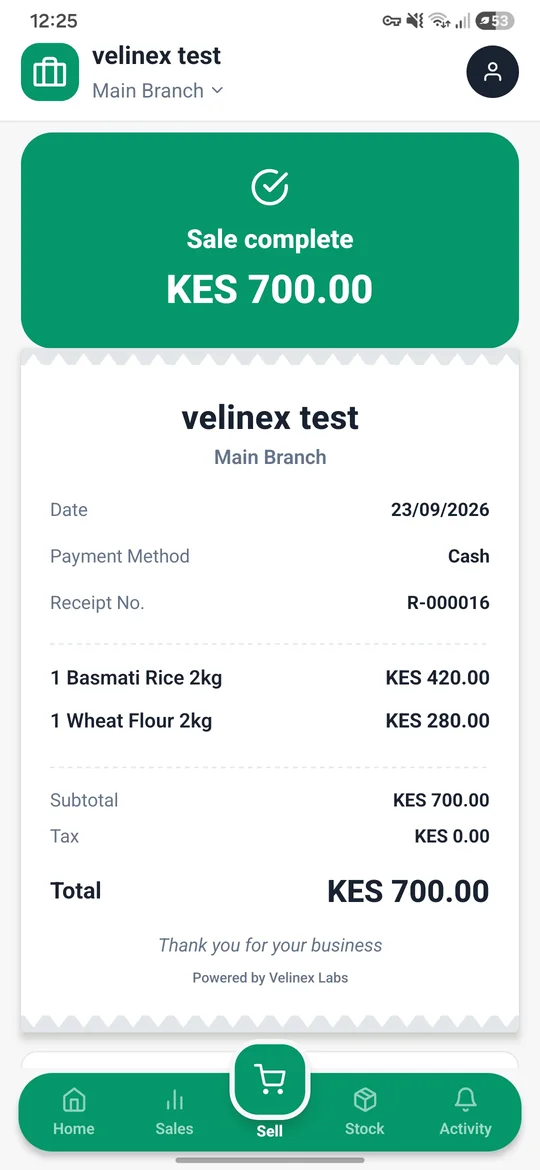
Owner app receipt for a completed KES 700 sale
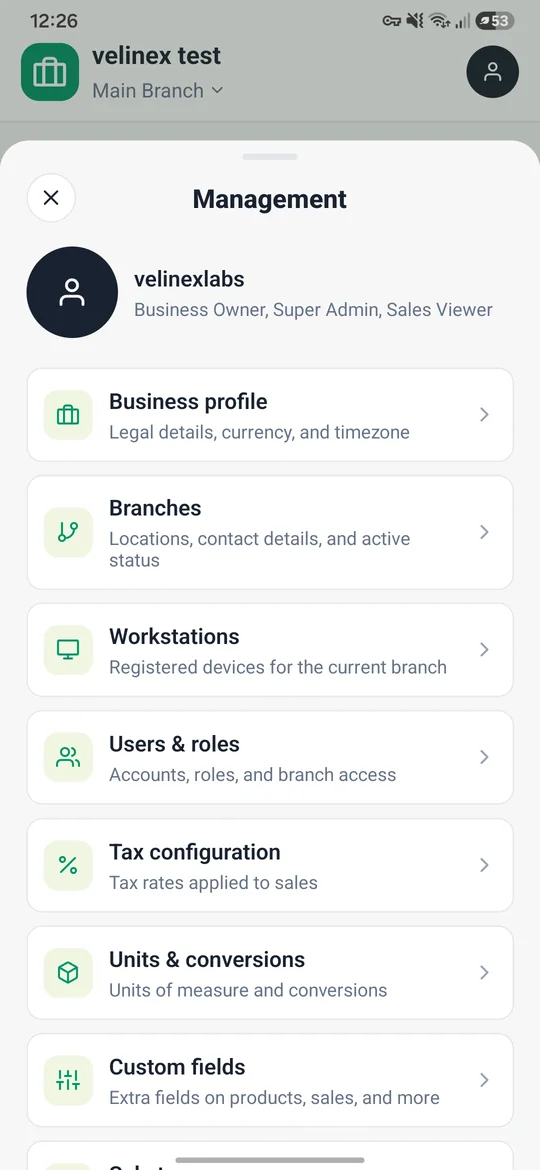
Owner app Management screen with business, branch and staff settings
Getting started

Selling in three steps

01

Install it on your shop computer

Download General POS and install it on the computer at your counter.

02

Register and pay by M-Pesa

Enter your business details, pick a plan and approve the M-Pesa prompt on your phone.

03

Add your products and start selling

We set up your system within a few minutes. Add your products, invite your staff and open the till.

Download

Works on the computer you already have

Install it on any Windows or Linux computer at the counter. When a new version is out, the app tells you and updates itself, so you only download it from here once.

All downloads and install notes
Prices

Pay once, then a small yearly fee

The first payment covers setup and a year of hosting, with backups and updates. From the second year, renew annually at the rate for your plan.

Starter

For one shop with one or two tills.

KES 15,000

once, then KES 3,000 a year from the second year

  • 1 branch
  • 2 tills
  • Set up and run by us, first year included
Get Starter

Base

Most popular

For up to three shops that share stock.

KES 25,000

once, then KES 5,000 a year from the second year

  • 3 branches
  • 6 tills
  • Set up and run by us, first year included
Get Base

Growth

For businesses with up to ten branches.

KES 40,000

once, then KES 10,000 a year from the second year

  • 10 branches
  • 20 tills
  • Set up and run by us, first year included
Get Growth
More than 10 branches? Talk to us or compare plans.
Questions

Common questions

You can keep selling for cash. Sales are saved on the till and sent automatically when the internet comes back.

A computer for each till, running Windows 10 or 11, or Linux. A barcode scanner and a receipt printer are useful but not required. You can also sell from your phone with the owner app.

The cashier enters the customer's number and a payment prompt appears on their phone. Once they pay, the till shows the sale as paid. The money can come through VeliPay, which needs no paperwork with Safaricom and keeps a 1% fee, or straight to your own paybill or till number.

Yes. The owner app shows sales, stock and staff activity for every branch, and you can also sign in to the desktop app from another computer.

You pay the yearly fee for your plan, starting at KES 3,000. If you miss it, everything keeps working for 14 more days. After that you can still see and download your records, but you cannot make new sales until you pay.

Yes. Your business owns its data, and you can export your sales and stock records. Supermarkets and other large shops can also host General POS on their own servers at an agreed price. You control the hosting and data; Velinex Labs provides software development and update delivery under the agreed service terms.

Start selling with General POS

Download the app, register your business and pay by M-Pesa. Your system is ready a few minutes later, and we keep it backed up and updated.